Usage: How to download
The LOGS.BAT file will automatically prompt for Local Admin Privileges and run a newly created PS1 script via -ExecutionPolicy Bypass.
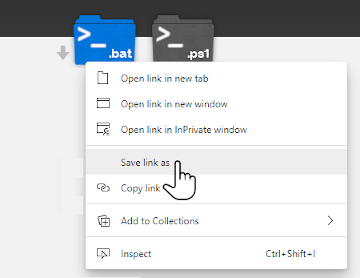
Right Click the above .bat link and choose Save As or Save Link As:
Once the file has saved locally open it: 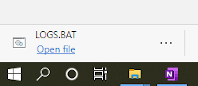
When attempting to run the .bat file you may be prompted by Smart Screen Filter in Windows
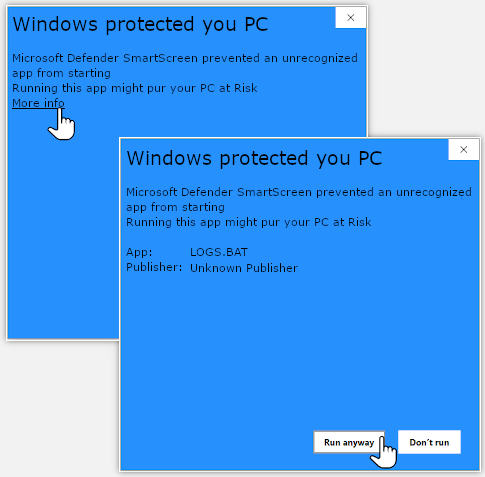
Choose: More info and then Run anyway
Accept User Account Control options to run the according PowerShell script with full execution rights.
Note: if you experience any issue running the .bat file, you are able to run the PS1 file in PowerShell ISE as an Administrator after running the command:
Set-ExecutionPolicy Unrestricted
Details
Latest Version is 1.6.3
Project migrated from Technet Gallery on 5/2020 due to site retirement
TechNet Gallery Retirement
Collection Methods
-
We now have the option to run collections independently – By default EventSearch, SetupDiag, Windows Update, Network Diagnostics, PowerCFG, GPResult and Misc Collections are all checked to be collected – so there is no need to modify the check-boxes unless you only want to collect a single group of logs
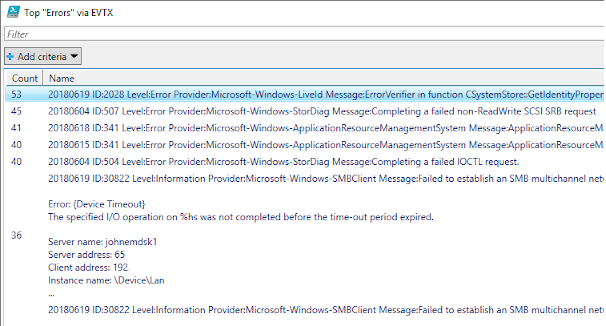
- TOP-ERRORS.TXT will also now also open in a GUI Out-Gridview allowing filtering if you choose the option (unchecked by default):
- Choose which logs to collect:
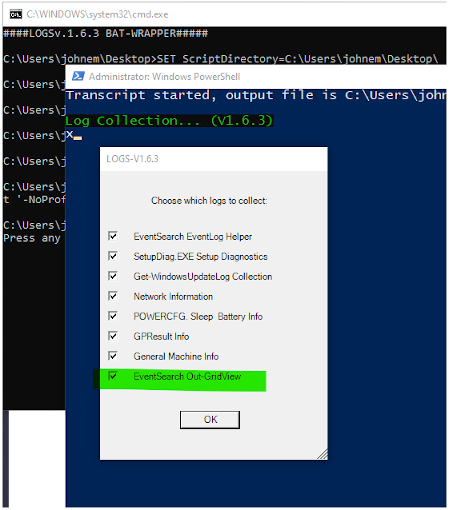
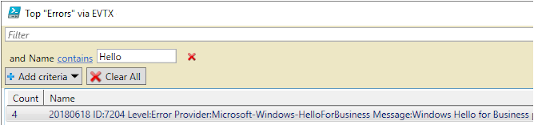
- Full filtering options in Out-GridView are also available:
- Additional Helper Files & collections:
- All files are written to %temp%\LOGS\GPRESULT
- This location should be zipped after collection, expect .log/.txt to compress 90%
- TOP-ERRORS.TXT contains a count of duplicated errors against a given day - this can help to spot certain scenarios but will also include false positives
- WER-SUMMARY.TXT contains a count of all Windows Error Reports queried from C:\Users\All Users\Microsoft\Windows\WER\ReportArchive
-DXDiag, MSINFO32, CBS, DISM and Windows Update Logs are all collected- Get-WindowsUpdateLog is executed and parsed ETL files are written to Windows-Update.log
- All *EVTX Logs containing “error” or “fail” are collected in the /EVTX/ folder by default
- Setupdiage.exe will download and run by default unless you uncheck it
- Setupdiag.exe will run as a job and should take less than 10 minutes - after 10 minutes the collection for this task will abort
- Utilize this collection for Setup, In-Place and Feature Upgrade scenarios only - logs: SetupDiag-Log.zip & SetupDiag*.log
- NOTE: Additional separate setup collections exist in /SETUP/ w/ SETUP-OOBE & SetupAct-Regex.TXT helper files
- /Network/ folder contains basic queries against SMB information, proxy info and WLAN Reports
- /POWER/ folder contains basic POWERCFG and Sleep-Study queries
- All files are written to %temp%\LOGS\GPRESULT
Scripts
Batch Wrapper
LOGS.PS1 is wrapped in a batch(.BAT) wrapper; LOGS.BAT which will generate two new files:
- LOGS_.PS1 has the top 10 lines of the original batch script from LOGS.BAT included
- These top 10 lines are then removed and a new file is Generated, LOGS.PS1 which is ran via ExecutionPolicy Bypass
- This allows the LOGS.PS1 PowerShell script to be run with appropriate privileges after User Account Control prompts are granted
- All logs are written to %temp%\LOGS\GPRESULT
- It is encouraged to delete all files generated before running the script a second time (including in %temp%)
@echo ####LOGSv.1.6.3 BAT-WRAPPER#####
SET ScriptDirectory=%~dp0
CD /D %ScriptDirectory%
type LOGS.BAT > LOGS_.PS1
MORE /E +10 %ScriptDirectory%LOGS_.PS1 > %ScriptDirectory%LOGS.PS1

SET PowerShellScriptPath=%ScriptDirectory%LOGS.PS1
PowerShell -NoProfile -ExecutionPolicy Bypass -Command "& {Start-Process PowerShell -ArgumentList '-NoProfile -ExecutionPolicy Bypass -File ""%PowerShellScriptPath%""' -Verb RunAs}";
PAUSE
PowerShell Script
In the event that the LOGS.BAT batch file fails to run the collection (due to AV or otherwise) it is also possible to run the PS1 script directly - preferably in PowerShell ISE as an Administrator The steps to do that would be as follows:
- Open PowerShell ISE as an Administrator on your local Windows System (Search for “ise” in Start, Right Click PowerShell ISE and Choose Run as administrator…
- Type in the command mentioned below: Set-ExecutionPolicy Unrestricted in the console and hit enter and accept appropriate prompts
- Left click the ps1 link at the top of this page to view the full PS1 script and copy the entire script
- Paste the script in full into the white pane in PowerShell ISE
- Click the Green Go button in PowerShell ISE to execute the script
####LOGS.PS1 v.1.6.3#####
## PLEASE RUN THIS SCRIPT IN POWERSHELL ISE AS AN ADMINISTRATOR
## REMEMBER TO >> > > SET-EXECUTIONPOLICY UNRESTRICTED < < <<
### Changes in 1.6.3:
### Added DISM /Online /Get-Packages to Installed_Updates.TXT
### Added miglog.xml, *APPRAISER*.xml to /SETUP/ Collection
### Added /Windows/Minidump/*.DMP to DMP collection
### FUNCTIONS_DEF ###
function wh
{
Param ( [parameter (Mandatory = $true)][string]$txt )
Write-Host $txt -ForegroundColor Green -BackgroundColor Black -NoNewline
##Example usage wh "Alias for `n Write-Host"
} ## End function wh
function StartScript
{
##Locating Temp Dir and writing Transcript
$global:tempDir = [System.IO.Path]::GetTempPath()
MD $tempDir\LOGS -EA SilentlyContinue
CD $tempDir\LOGS
$txtCount = Get-Item $tempDir/LOGS/*.TXT -EA SilentlyContinue
if((Get-Host).Version.Major -cge 5) ##WIN7 Not Supported
{
if($txtCount.Count -cge 1)
{Start-Transcript -Append -Path $tempDir/LOGS/Event-Search.TXT}
Else{Start-Transcript -Path $tempDir\LOGS\Event-Search.TXT}
}
$global:explore = $tempDir + "LOGS\"
$global:Ver = "1.6.3"
wh "`nLog Collection... (V$Ver)`n"
#clearing previous actions
Stop-Job *
#Initialize CheckBox Vars to $True/$False
$Global:EventsCollect = $true; $Global:SetupDiagCollect = $true
$Global:UpdatesCollect = $true; $Global:WLANCollect = $true
$Global:PowerCollect = $true; $Global:GPCollect = $true
$Global:miscCollect = $true; $Global:bingCollect = $true
$Global:eventOut = $false
#Clear Jobs
Stop-Job *
Remove-Job *
} ## End function Start-Script
function SetupDiagFunc
{
wh "`n Grabbing SetupDiag.exe ..."
Invoke-WebRequest https://go.microsoft.com/fwlink/?linkid=870142 -OutFile $tempDir\SetupDiag.exe -TimeoutSec 3 -UseBasicParsing
#check for successful download
if((Get-Item $tempDir\SetupDiag.exe).length -gt 100000)
{
wh "`nSuccessful DL!"
wh "`n Invoking SetupDiag.exe ..."
$SetupDiag = {CMD.EXE /C "%temp%\setupdiag.exe /Verbose /Output:%temp%\SetupDiag-Log.txt"}
## Kick-Off SetupDiagJob
Start-Job -Name SetupDiagJob -ScriptBlock $SetupDiag
}Else{Write-Host "`nDownload of SetupDiag.exe Failed!" -BackgroundColor RED }
} ## End Function SetupDiagFunc
function EventSearch
{
wh "`n Starting EventSearch Job-Function ...`n"
## Gathering Events from System using Get-WinEvent via Job
$EventSearchJob =
{
$evtPaths = Get-Item C:\Windows\System32\Winevt\Logs\*.evtx -Exclude "*PowerShell*",
"*known folders*" | Select-Object FullName
$i = $evtPaths.Count
$x = 0 ##For 1st Loop do Until x = i
$events = @()
$gatherEvents = @()
$eventsArray = @()
$searchResult = @()
$MaxEvents = 99
#Loading/Gathering Events Loop...
do {
##Getting Events w/ Get-WinEvent
$gatherEvents = Get-WinEvent -Path $evtPaths[$x].FullName -MaxEvents $MaxEvents -EA SilentlyContinue
$events = $events + $gatherEvents
$x++
}
Until ($x -eq $i)
$x = $x +1 ##Total Events Found!
$eventsLength = $events.Length ##Total events catalogged!
$xx = 0
# Write Event Properties to a row and roll it out - Collapsing Array ...
do {
$date = $events[$xx].TimeCreated | Get-Date -Format "yyyyMMdd".ToString() -EA SilentlyContinue ##EA SC for Blank Entries
$eventRow = new-object PSObject -Property @{
Date = $date;
Id = $events[$xx].Id;
Level = $events[$xx].LevelDisplayName;
Provider = $events[$xx].ProviderName;
Message = $events[$xx].Message;
}
$cRow = $date + " " + "ID:" + $events[$xx].Id + " " + "Level:" + $events[$xx].LevelDisplayName + " " + "Provider:" + $events[$xx].ProviderName + " " + "Message:" + $events[$xx].Message
$eventsArray += $cRow
$xx++
$d++
}
Until ($xx -eq $events.Length)
##Looking for patterns error or fail in $eventsArray
$search = $eventsArray | Select-String -pattern ("error|fail")
Return $search ## | Write-Output ##Output for job
} ## End $EventSearchJob
Start-Job -Name EventSearchJob -ScriptBlock $EventSearchJob
} ## End function Event-Search
function writeSearch ##
{
##Event Logs Cont.
MD $tempDir\LOGS\EVTX\ -EA SilentlyContinue
##output to file
$search | Group-Object | Sort-Object Count -Descending | Format-Table Count, Name -Wrap > TOP-ERRORS.TXT
$search > $tempDir\LOGS\SEARCH.TXT
if($Global:eventOut -eq $True)
{
$search | Group-Object | Sort-Object Count -Descending |
Select-Object -Property Count, Name | Out-GridView -Title "Top `"Errors`" via EVTX - V-$Ver"
}
wh "`n Collecting Matching EVTX Entries ...`n"
#Collecting all prev matching EVTX
#$evtx = Get-ChildItem C:\Windows\System32\Winevt\Logs\*.evtx
$evv = 0
$providerName =
(($search | Select-String "Provider:.*Message:").Matches.Value -Replace
" Message:", "" -Replace "Provider:", "" | Group-Object ).Name
#Converting Provider Name to Log Name
$providerName = (($providerName | ForEach-Object {Get-WinEvent -ProviderName $_ -MaxEvents 1 -EA SilentlyContinue}).LogName | Group-Object).Name
$providerName = $providerName -replace "Microsoft.", ""
$providerName = $providerName -replace "Windows.", ""
$providerName = $providerName -replace "`/.*$", ""
$evtx = $providerName | foreach{Get-ChildItem "C:\Windows\System32\winevt\logs\*$_*"}
Do{
COPY $evtx[$evv].PSPath $tempDir\LOGS\EVTX\
$evv++
}
Until($evv -eq $evtx.Count)
} #End function writeSearch
function GetUpdates
{
wh "`n Starting Get-WindowsUpdateLog Job-Function ...`n"
$updateJob = {get-WindowsUpdateLog}
if((Get-Host).Version.Major -cge 5) ##Modern Gatherer
{
Start-Job -Name GetUpdates -ScriptBlock $updateJob
}
##Legacy Gatherer
CP C:\Windows\WindowsUpdate.log $tempDir\LOGS\WindowsUpdate.log
##Installed-Updates/Packages
Get-WmiObject win32_quickfixengineering > $tempDir\LOGS\Installed_Updates.TXT
Get-WmiObject Win32_OperatingSystemQFE >> $tempDir\LOGS\Installed_Updates.TXT
DISM /Online /Get-Packages /Format:Table >> $tempDir\LOGS\Installed_Updates.TXT
} ## End function Get-Updates
function PrinterCheck
{
wh "`n Getting Printer Information ..."
get-printer | ft Name, ComputerName, Type, DriverName, PortName, Datatype, Location, DriverName > $tempDir\LOGS\Printers.TXT
get-printerDriver | fl >> $tempDir\LOGS\Printers.TXT
Get-ChildItem -Recurse Registry::"HKLM\SYSTEM\CurrentControlSet\Control\Print\Environments\Windows NT x86\Drivers" | Out-File $tempDir\LOGS\Printers.TXT -Append
Get-ChildItem -Recurse Registry::"HKLM\SYSTEM\CurrentControlSet\Control\Print\Environments\Windows x64\Drivers" | Out-File $tempDir\LOGS\Printers.TXT -Append
Get-ChildItem -Recurse Registry::"HKLM\SYSTEM\CurrentControlSet\Control\Print\Monitors" | Out-File $tempDir\LOGS\Printers.TXT -Append
write-output "## CBS ntprint CHECK ##" >> $tempDir\LOGS\Printers.TXT
$cbsCheck = (Get-ChildItem C:\Windows\Logs\CBS\*cbs* -Recurse | select-string -Pattern "E_INVALIDARG in eventsXml.*Microsoft-Windows-PrintService")
if($cbsCheck.Count -eq 0){Write-Output "## NO MATCHES IN CBS ##" >> $tempDir\LOGS\Printers.TXT} Else{$cbsCheck | Group-Object >> $tempDir\LOGS\Printers.TXT}
write-output "## ntprint.dll CHECK ##" >> $tempDir\LOGS\Printers.TXT
(Get-ChildItem C:\Windows\System32\ntprint.dll).VersionInfo | ft -AutoSize >> $tempDir\LOGS\Printers.TXT
(Get-ChildItem C:\Windows\SysWOW64\ntprint.dll).VersionInfo | ft -AutoSize >> $tempDir\LOGS\Printers.TXT
} ## End function PrinterCheck
function UpdateHelper
{
if((Get-Host).Version.Major -cge 5)
{
$winupdatelog = get-item $tempDir\LOGS\windows-update.log ##WIN-10 File
MD $tempDir\LOGS\Windows\Logs\WindowsUpdate\ -EA SilentlyContinue | Out-Null
CP C:\Windows\Logs\WindowsUpdate\*.etl $tempDir\LOGS\Windows\Logs\WindowsUpdate\ -EA SilentlyContinue
}
Else{$winupdatelog = get-item $tempDir\LOGS\windowsupdate.log} ##LEGACY File
$updateError = ($winupdatelog | select-string -pattern "error.*0x........");
$updateErrorSplit = $updateError -Split " "
$updateErrorCount = (($updateErrorSplit | select-string -pattern "0x........") -Replace "[(),'`.:]", "" -Replace "hr=", "");
$updateErrorCount | Group-Object | Sort-Object Count -Descending | Format-Table Count, Name | Out-File $tempDir\LOGS\UPDATE-ERRORS.TXT -Width 999
$updateError >> UPDATE-ERRORS.TXT
if($updateError.length -eq 0){"No `"error.*0x........`" patterns Found in Windows-Update.log" | Out-File $tempDir\LOGS\UPDATE-ERRORS.TXT}
($winupdatelog | Select-String "KB\d\d\d\d\d\d\d" | Select-string "fail") | Out-file $tempDir\LOGS\UPDATE-ERRORS.TXT -Append -width 999
} ## End function UpdateHelper
function getProcesses
{
wh "`nGetting Active Process ...`n"
Get-Process > $tempDir\LOGS\Running-Processes.TXT
CMD.EXE /C "tasklist /svc" | Out-File -Append $tempDir\LOGS\Running-Processes.TXT
} ## End function getProcesses
function GetApps
{
wh "`n Getting List of Installed Apps...`n"
Get-WmiObject -Class Win32_Product | Format-Table -Property Name, Version, Vendor > $tempDir\LOGS\Installed-Apps.TXT
Get-AppxPackage | ft Name, Version, InstallLocation, IspArtiallyStaged, SignatureKind, Status >> $tempDir\LOGS\Installed-Apps.TXT
} ## End function GetApps
function SetupLogs
{
wh "`nGetting Windows Setup Logs Independent of SetupDiage.exe...`n"
MD $tempDir\LOGS\SETUP\ -EA SilentlyContinue
dir C:\ > $tempDir\LOGS\Dir_Structure.txt
## Main Setup Collection
if($env:SystemDrive -eq 'C:') ##Verify SystemDrive
{
$SetupPaths = @()
$locations = @(
'C:\GetCurrent',
'C:\$Reset',
'C:\$SysReset',
'C:\$Windows.~BT',
'C:\$Windows.~WS',
'C:\Windows\Logs\',
'C:\Windows\Panther\',
'C:\Windows\inf\',
'C:\Windows\System32\LogFiles\',
'C:\Windows\System32\SysPrep\',
'C:\Windows10Upgrade',
'C:\Windows.old\Windows\Panther')
for($i = 0; $locations.count -gt $i; $i++)
{
if((get-item $locations[$i] -Force -EA SilentlyContinue).length -gt 0) ##Null Path Check -Force for Hidden
{
CD $locations[$i]
##Search includes setuperr/setupact only
$SetupPaths += Get-ChildItem * -Force -Recurse -Include setuperr.log, setupact.log, miglog.xml, *APPRAISER_Humanreadable.xml -EA SilentlyContinue
}
}
$cleanPaths = @()
for($i = 0; $SetupPaths.count -gt $i; $i++)
{
$cleanPaths += $SetupPaths[$i].PSParentPath.ToString() -replace "Microsoft\.PowerShell\.Core\\FileSystem\:\:C\:\\", ""
}
CD $tempDir\LOGS\SETUP\
MD $cleanPaths -Force
CD $tempDir\LOGS\
for($i = 0; $SetupPaths.count -gt $i; $i++)
{
$destPath = "$tempDir\LOGS\SETUP\" + $cleanPaths[$i]
$copyPathLog = ($SetupPaths[$i].ToString())
Copy $copyPathLog -Destination $destPath
}
}Else{Write-Host "`nSystem Drive is not C:... Setup Collection Aborted!`n"}
## End Main Setup Collection
## Setup Reg Output
Get-ChildItem HKLM:\SYSTEM\SETUP\ | Out-File $tempDir\LOGS\SETUP\HKLM_SYSTEM_SETUP-OOBE.TXT
Get-ChildItem HKLM:\SOFTWARE\Microsoft\Windows\CurrentVersion\OOBE\Me* -recurse -EA SilentlyContinue | Out-File $tempDir\LOGS\SETUP\HKLM_SYSTEM_SETUP-OOBE.TXT -Append
Get-Childitem HKLM:SOFTWARE\Microsoft\Windows\CurrentVersion\WindowsUpdate | Out-File $tempDir\LOGS\SETUP\HKLM_SYSTEM_SETUP-OOBE.TXT -Append
## SetupAct String Search
$setupRegx = @("MOUPG SetupHost..Initialize:",
"============================",
(Get-ChildItem $tempDir\LOGS\*setupact.log -Recurse | Select-String "MOUPG SetupHost..Initialize. CmdLine"),
"",
"MOUPG Setup build & Host OS Build:",
"==================================",
"",
(Get-ChildItem $tempDir\LOGS\*setupact.log -Recurse | Select-String "MOUPG SetupHost..Setup build"),
"...",
(Get-ChildItem $tempDir\LOGS\*setupact.log -Recurse | Select-String "MOUPG Host OS"),
"",
"Watson Parameters (4&5):",
"=======================",
"",
(Get-ChildItem $tempDir\LOGS\*setupact.log -Recurse | Select-String "Watson Bucketing Parameters\[[4-5]\]" ),
"",
"\[0x........\]Error:",
"==================",
"",
(Get-ChildItem $tempDir\LOGS\*setupact.log -Recurse | Select-String "\[0x........\]\[0x.....\]"),
"",
"`"FATAL`":",
"======",
"",
(Get-ChildItem $tempDir\LOGS\*setupact.log -Recurse | Select-String "FATAL" | Select-String -NotMatch "FatalExecutionEngineError" | Select-String -NotMatch "non-fatal"),
"",
"`"Error `":",
"===========",
"",
(Get-ChildItem $tempDir\LOGS\*setupact.log -Recurse | Select-String "Error "),
"",
"MIGRATE.*DATA:",
"==============",
"",
(Get-ChildItem $tempDir\LOGS\*setupact.log -Recurse | Select-String "MIGRATE.*DATA"),
""
)
$q=0
Do {$setupRegx[$q] | Out-File $tempDir\LOGS\SETUP\SetupAct-Regex.TXT -Append -Width 999 ##spool out results
$q++
}Until($q -eq $setupRegx.Count)
} ## End function SetupLogs
function powerCFGInfo
{
MD $tempDir\LOGS\POWER\ -EA SilentlyContinue | Out-Null
wh "`n Grabbing PowerCFG, Sleep & Battery Info ...`n"
("`n" + "Available Sleep States (/A): `r" + "`n" +"============================`r" + "`r").ToString() | Out-File -Encoding ascii $tempDir\LOGS\POWER\POWERCFG_INFO.txt
powercfg /a | Out-File -Append -encoding ascii $tempDir\LOGS\POWER\POWERCFG_INFO.txt
("`n" + "-DeviceQuery Wake_Armed: `r" + "`n" +"========================`r" + "`r").ToString() | Out-File -Append -Encoding ascii $tempDir\LOGS\POWER\POWERCFG_INFO.txt
powercfg -devicequery wake_armed | Out-file -Append -encoding ascii $tempDir\LOGS\POWER\POWERCFG_INFO.txt
("`n" + "Last Wake (-lastwake): `r" + "`n" +"=====================`r" + "`r").ToString() | Out-File -Append -Encoding ascii $tempDir\LOGS\POWER\POWERCFG_INFO.txt
powercfg -lastwake | Out-file -Append -encoding ascii $tempDir\LOGS\POWER\POWERCFG_INFO.txt
("`n`r").ToString() | Out-File -Append -Encoding ascii $tempDir\LOGS\POWER\POWERCFG_INFO.txt
("`n" + "-Requests: `r" + "`n" +"==========`r" + "`r").ToString() | Out-File -Append -Encoding ascii $tempDir\LOGS\POWER\POWERCFG_INFO.txt
powercfg -requests | Out-file -Append -encoding ascii $tempDir\LOGS\POWER\POWERCFG_INFO.txt
$powerList = powercfg -list
$powerList | Out-File -Append -encoding ascii $tempDir\LOGS\POWER\POWERCFG_INFO.txt
$powerActive = $powerList | select-string "\*" | powercfg /QH "$_"
("`n`r").ToString() | Out-File -Append -Encoding ascii $tempDir\LOGS\POWER\POWERCFG_INFO.txt
("`n" + "Active Power Scheme Details: `r" + "`n" +"============================`r" + "`r").ToString() | Out-File -Append -Encoding ascii $tempDir\LOGS\POWER\POWERCFG_INFO.txt
$powerActive | Out-File -Append -encoding ascii $tempDir\LOGS\POWER\POWERCFG_INFO.txt
if((Get-Host).Version.Major -cge 5) ##WIN7 Does not Support powercfg /battery /sleepstudy
{
$ifbattery = Get-WmiObject win32_battery
if ( $ifbattery.__SERVER.count -cge 1 ) { CMD.EXE /C "powercfg /batteryreport /output %temp%\LOGS\POWER\battery-report.html" }
CMD.EXE /C "powercfg /sleepstudy /output %temp%\LOGS\POWER\sleepstudy-report.html"
}
CMD.EXE /C "powercfg /ENERGY /duration 10 /output %temp%\LOGS\POWER\energy-report.html"
} ## End function powerCFGInfo
function sysProductCheck
{
wh "`n Getting SystemProductName ...`n"
##SystemInformation Reg
reg query HKEY_LOCAL_MACHINE\System\CurrentControlSet\Control\SystemInformation\ /v SystemProductName > $tempDir\LOGS\REG_SystemProductName.TXT
Get-WmiObject Win32_ComputerSystem > $tempDir\LOGS\WMI_Object_System.TXT
Get-WmiObject Win32_ComputerSystemProduct >> $tempDir\LOGS\WMI_Object_System.TXT
} ## End functions sysProductCheck
function showWLAN
{
wh "Generating NETSH WLAN Report...`n"
$showWLANjob = {
CMD.EXE /c "netsh wlan show networks mode=ssid > %temp%\LOGS\Network\wlan.txt"
CMD.EXE /c "netsh wlan show networks mode=bssid >> %temp%\LOGS\Network\wlan.txt"
CMD.EXE /c "netsh winhttp show proxy > %temp%\LOGS\Network\proxy.txt"
CMD.EXE /c "netsh wlan show wlanreport & COPY C:\ProgramData\Microsoft\Windows\wlanReport\wlan-report-latest.html %temp%\LOGS\Network\wlan-report-latest.html"
##WIN7 Does not Support netsh wlanreport
}
Start-Job -Name showWLAN -ScriptBlock $showWLANjob
} ## End function sysProductCheck
function getGPRESULT
{
wh "`nGetting GPRESULT...`n"
CMD.EXE /C "GPRESULT /V > %temp%\LOGS\GPRESULT.TXT"
} ## End function getGPRESULT
function reservedCheck
{
$reservedJob =
{
$vol = (mountvol /L | select-string -Pattern "\\\\")
$volstring = "mountvol y:" + $vol[0]
CMD.EXE /C $volstring
SLEEP 2
CMD.EXE /C "CHKDSK y: > %temp%\LOGS\SystemReserved.TXT"
SLEEP 2 # Pause after drive dismount
CMD.EXE /C "mountvol y: /D"
}
Start-Job -Name reservedJob -ScriptBlock $reservedJob
} ## End function reservedCheck
function fltmcCheck
{
wh "`n Getting fltmc Filters ...`n"
CMD.EXE /c "fltmc filters > %temp%\LOGS\fltmc_filters.TXT"
} ## End function fltmcCheck
function getDXDiag
{
wh "`n Grabbing DXDiag Info...`n"
C:\Windows\System32\dxdiag /x $explore\DxDiag
} ## End function getDXDiag
function getMSINFO
{
wh "`n Gathering MSINFO32 ...`n"
## check if msinfo is already gathering - if so stop
If((get-process | select-string -Pattern "msinfo").Pattern -eq "msinfo")
{Stop-Process -ProcessName msinfo32}
C:\Windows\System32\msinfo32.exe /nfo $tempDir/LOGS/MSINFO32.NFO
} ## End function getMSINFO
function getAV
{
if((Get-Host).Version.Major -cge 5) ##Modern OS Only
{
wh "`n Grab root\SecurityCenter2 AntivirusProduct ...`n"
$avPath = (Get-WmiObject -Namespace root\SecurityCenter2 -Class AntivirusProduct) | % {$_.pathtoSignedProductEXE}
"AV Info" + "`n========" | Out-File $tempDir/LOGS/SecurityProductInformation.TXT
$avPath | Out-File $tempDir/LOGS/SecurityProductInformation.TXT -Append
if($avPath[0] -match "exe")
{
$path = (Get-Item $avPath[0]).PSParentPath
Get-Item $path/*.ini | Out-File $tempDir/LOGS/SecurityProductInformation.TXT -Append
Get-Content $path/*.ini | Out-File $tempDir/LOGS/SecurityProductInformation.TXT -Append
}
Get-ChildItem "HKLM:\SOFTWARE\Policies\Microsoft\Windows Defender\" -recurse -EA SilentlyContinue | Out-File $tempDir/LOGS/SecurityProductInformation.TXT -Append
}
} ## End function getAV
function getDrivers
{
wh "`n Grabbing Driver listing via DISM.EXE ...`n"
$drivers = cmd.exe /C "dism /online /get-drivers /format:table"
$drivers += cmd.exe /C "dism /online /get-drivers /all /format:table"
$drivers | Out-File $tempDir/LOGS/DISM-Get-Drivers.TXT
wh "`n Done!`n"
} ## End Function getDrivers
function getMISCLogs
{
wh "`nCopying misc. logs ...`n"
MD $tempDir\LOGS\WER\ -EA SilentlyContinue
MD $tempDir\LOGS\Windows\Logs\WindowsUpdate\ -EA SilentlyContinue
CP "C:\Users\All Users\Microsoft\Windows\WER\ReportArchive\*" $tempDir\LOGS\WER\ -Recurse -EA SilentlyContinue
CP "C:\Windows\Logs\CBS\*cbs*" $tempDir\LOGS\Windows\Logs\
CP "C:\Windows\Logs\DISM\*dism*" $TempDir\LOGS\Windows\Logs\
CP "C:\Windows\Logs\WindowsUpdate\*" $TempDir\LOGS\Windows\Logs\WindowsUpdate\
#DMP Collect
$dmp = @()
$dmp += Get-ChildItem C:\Windows\*.dmp
$dmp += (Get-ChildItem C:\Windows\LiveKernelReports\*.dmp -Recurse -EA SilentlyContinue)
$dmp += (Get-ChildItem C:\Windows\Minidump\*.dmp -Recurse -EA SilentlyContinue)
#Validate empty array
if($dmp.length -ne 0)
{
$dd=0
Do{
If($dmp[$dd].length -lt 2000000)
{ $destPath = $dmp[$dd].PSParentPath.Replace('C:\', '').Replace('Microsoft.PowerShell.Core\FileSystem::', '')
MD $destPath -EA SilentlyContinue
COPY -Path $dmp[$dd].PSPath -Destination $destPath }
$dd++
}
Until($dd -eq $dmp.Count)
}
#disk info
"`nGet-Disk:`n=========" > $tempDir\LOGS\Disk-Info.TXT
Get-Disk |fl >> $tempDir\LOGS\Disk-Info.TXT
"`nGet-Partition:`n==============" >> $tempDir\LOGS\Disk-Info.TXT
Get-Partition >> $tempDir\LOGS\Disk-Info.TXT
Manage-bde -protectors -get C: >> $tempDir\LOGS\Disk-Info.TXT
"`nIO Fail Search:`n===============`n" >> $tempDir\LOGS\Disk-Info.TXT
$search | Select-String ".*io.fail.*" | Select-String -NotMatch '0, 0, 0, 0' >> $tempDir\LOGS\Disk-Info.TXT
} ## End function getMISCLogs
function bingCollect
{
##O365 Firewall Check & Bing.com diagnostics.asp
##URIs based on Article:
##https://support.office.com/en-us/article/Network-requests-in-Office-365-ProPlus-and-Mobile-eb73fcd1-ca88-4d02-a74b-2dd3a9f3364d
MD $TempDir\LOGS\Network\ -EA SilentlyContinue
wh "Performing Bing & O365 URI Check ... `n"
$bingCheck = (Invoke-WebRequest -Uri https://www.bing.com/fdv2/diagnostics.aspx -UseBasicParsing)
$bingCheck | Out-File $tempDir\LOGS\Network\O365-URL-Query.TXT
$URIs = @('api.login.microsoftonline.com', #0 Standard Reply = 403
'api.passwordreset.microsoftonline.com', #1 Standard Reply = 200
'becws.microsoftonline.com', #2 Standard Reply = 403
'clientconfig.microsoftonline-p.net', #3 Standard Reply = 404
'companymanager.microsoftonline.com', #4 Standard Reply = 403
'device.login.microsoftonline.com', #5 Standard Reply = 200
'graph.microsoft.com', #6 Standard Reply = 404
'hip.microsoftonline-p.net', #7 Standard Reply = 404
'hipservice.microsoftonline.com', #8 Standard Reply = 404
'login.microsoft.com', #9 Standard Reply = 200
'login.microsoftonline.com', #10 Standard Reply = 200
'logincert.microsoftonline.com', #11 Standard Reply = 200
'loginex.microsoftonline.com', #12 Standard Reply = 200
'login-us.microsoftonline.com', #13 Standard Reply = 200
'login.microsoftonline-p.com', #14 Standard Reply = 200
'login.windows.net', #15 Standard Reply = 200
'nexus.microsoftonline-p.com', #16 Standard Reply = 403
'passwordreset.microsoftonline.com', #17 Standard Reply = 200
'provisioningapi.microsoftonline.com', #18 Standard Reply = 403
'stamp2.login.microsoftonline.com', #19 Standard Reply = 200
'ccs.login.microsoftonline.com', #20 Standard Reply = 401
'ccs-sdf.login.microsoftonline.com', #21 Standard Reply = 401
'accounts.accesscontrol.windows.net', #22 Standard Reply = 200
'secure.aadcdn.microsoftonline-p.com', #23 Standard Reply = 400
'windows.net', #24 Standard Reply = 200
'phonefactor.net', #25 Standard Reply = 200
'account.activedirectory.windowsazure.com', #26 Standard Reply = 404
'secure.aadcdn.microsoftonline-p.com', #27 Standard Reply = 400
'login.windows.net', #28 Standard Reply = 200
'provisioningapi.microsoftonline.com', #29 Standard Reply = 403
'mscrl.microsoft.com', #30 Standard Reply = 400
'secure.aadcdn.microsoftonline-p.com', #31 Standard Reply = 400
'windowsupdate.microsoft.com', #32 Standard Reply = 200
'update.microsoft.com', #33 Standard Reply = 200
'au.download.windowsupdate.com', #34 Standard Reply = 200
'download.windowsupdate.com', #35 Standard Reply = 200
'download.microsoft.com', #36 Standard Reply = 200
'tlu.dl.delivery.mp.microsoft.com'); #37 Standard Reply = 403
$count = 0;
$queryResult =@{};
Write-Host "Checking URIs .." -NoNewline
Do {
Try{
$queryResult[$count] = (Invoke-WebRequest -Uri ("http:`/`/" + $URIs[$count]) -Method Head -UseBasicParsing -TimeoutSec 2).RawContent
}Catch{ $catch = $_ }
if($queryResult[$count].Count -eq 0)
{$queryResult[$count] = ($catch[$catch.count -1].ToString()).Replace("`n", " ")}
Write-Host "." -NoNewline
$count++
}Until ($count -eq ($URIs.Count));
Write-Host "."
Get-Date | Out-File $tempDir\LOGS\Network\O365-URL-Query.TXT -Append
$queryResult | Out-File $tempDir\LOGS\Network\O365-URL-Query.TXT -Append
Write-Host " Bing Check", `n, "==========" | Out-File $tempDir\LOGS\Network\O365-URL-Query.TXT -Append
wh "`n`n`n`URL Check Finished...`n"
}
function smbConfig
{
$CMDs =
{ cmd.exe /c "net config server"
cmd.exe /c "net config workstation"
Get-SmbClientNetworkInterface
Get-SmbServerConfiguration
Get-SmbClientConfiguration
Get-ChildItem "HKLM:\SYSTEM\CurrentControlSet\Services\LanmanServer"
Get-NetAdapterAdvancedProperty | ft }
ForEach-Object{Invoke-Command $CMDs | Out-File $TempDir\LOGS\NETWORK\$env:COMPUTERNAME-SMB-Config.TXT -Append}
$share = Get-SmbShare
ForEach-Object{Get-SmbShareAccess $share.Name | ft | Out-File $tempDir\LOGS\NETWORK\$env:COMPUTERNAME-SMB-Config.TXT -Append}
} ## End Function smbConfig
function regLang
{
DISM.EXE /Online /Get-Intl | Out-File $tempDir\LOGS\Reg-Lang.TXT
"`n","Get-WinUserLanguageList","=======================" | Out-File $tempDir\LOGS\Reg-Lang.TXT -Append
Get-WinUserLanguageList | Out-File $tempDir\LOGS\Reg-Lang.TXT -Append
"`n","Get-WinLanguageBarOption","========================" | Out-File $tempDir\LOGS\Reg-Lang.TXT -Append
Get-WinLanguageBarOption | Out-File $tempDir\LOGS\Reg-Lang.TXT -Append
}
function autoRotate
{
Get-ChildItem HKLM:SOFTWARE\Microsoft\Windows\CurrentVersion\Auto* | Out-File $tempDir\LOGS\AutoRotate.TXT
}
function checkBoxes
{
Add-Type -AssemblyName System.Windows.Forms
Add-Type -AssemblyName System.Drawing
$Global:form = New-Object System.Windows.Forms.Form
$Global:form.Text = "LOGS-V$ver"
$Global:form.Size = New-Object System.Drawing.Size(300,400)
$Global:form.StartPosition = 'CenterScreen'
$OKButton = New-Object System.Windows.Forms.Button
$OKButton.Location = New-Object System.Drawing.Point(100,300)
$OKButton.Size = New-Object System.Drawing.Size(75,23)
$OKButton.Text = 'OK'
$OKButton.DialogResult = [System.Windows.Forms.DialogResult]::OK
$Global:form.AcceptButton = $OKButton
$Global:form.Controls.Add($OKButton)
$Global:form.ControlBox = $false
$Global:boxNum = 1
$Global:checkBox = @{} #hash for $checkBox
$tag = @{} #hash for $label
$Global:Box = @{}
function createCheckBox
{
Param ( [parameter (Mandatory = $true)][string]$name,
[parameter (Mandatory = $true)][string]$label )
$drawingPoint = (50 + ($boxNum *25))
$Global:checkBox[$boxNum] = New-Object System.Windows.Forms.CheckBox
$Global:checkBox[$boxNum].Location = New-Object System.Drawing.Point(10,$drawingPoint)
$Global:checkBox[$boxNum].Size = New-Object System.Drawing.Size(15,15)
$Global:checkBox[$boxNum].Text = ''
$Global:checkBox[$boxNum].Checked = $true
$Global:form.Controls.Add($checkBox[$boxNum])
#SetupDiag Label
$tag[$boxNum] = New-Object System.Windows.Forms.Label
$tag[$boxNum].Location = New-Object System.Drawing.Point(40,$drawingPoint)
$tag[$boxNum].Size = New-Object System.Drawing.Size(280,20)
$tag[$boxNum].Text = "$label"
$Global:form.Controls.Add($tag[$boxNum])
$Global:boxNum ++
} #End nested function createCheckBox
createCheckBox -name "EV" -label "EventSearch EventLog Helper" #1
createCheckBox -name "SD" -label "SetupDiag.EXE Setup Diagnostics" #2
createCheckBox -name "WU" -label "Get-WindowsUpdateLog Collection" #3
createCheckBox -name "IP" -label "Network Information" #4
createCheckBox -name "PW" -label "POWERCFG. Sleep & Battery Info" #5
createCheckBox -name "GP" -label "GPResult Info" #6
createCheckBox -name "MS" -label "General Machine Info" #7
createCheckBox -name "EO" -label "EventSearch Out-GridView" #8
#Checkbox State Changes
$Global:checkBox[1].Add_CheckStateChanged(
{
if($Global:checkBox[1].checked -eq $True){ $Global:EventsCollect = $true ; Write-Host "." -nonewline} Else{ $Global:EventsCollect = $false }
})
$Global:checkBox[2].Add_CheckStateChanged(
{
if($Global:checkBox[2].checked -eq $True){ $Global:SetupDiagCollect = $true ; Write-Host "." -nonewline} Else{ $Global:SetupDiagCollect = $false }
})
$Global:checkBox[3].Add_CheckStateChanged(
{
if($Global:checkBox[3].checked -eq $True){ $Global:UpdatesCollect = $true ; Write-Host "." -nonewline} Else{ $Global:UpdatesCollect = $false }
})
$Global:checkBox[4].Add_CheckStateChanged(
{
if($Global:checkBox[4].checked -eq $True){ $Global:WLANCollect = $true ; Write-Host "." -nonewline} Else{ $Global:WLANCollect = $false }
})
$Global:checkBox[5].Add_CheckStateChanged(
{
if($Global:checkBox[5].checked -eq $True){ $Global:PowerCollect = $true ; Write-Host "." -nonewline} Else{ $Global:PowerCollect = $false }
})
$Global:checkBox[6].Add_CheckStateChanged(
{
if($Global:checkBox[6].checked -eq $True){ $Global:GPCollect = $true ; Write-Host "." -nonewline} Else{ $Global:GPCollect = $false }
})
$Global:checkBox[7].Add_CheckStateChanged(
{
if($Global:checkBox[7].checked -eq $True){ $Global:miscCollect = $true ; Write-Host "." -nonewline} Else{ $Global:miscCollect = $false }
})
$Global:checkBox[8].Add_CheckStateChanged(
{
if($Global:checkBox[8].checked -eq $True){ $Global:eventOut = $true ; $Global:checkBox[1].checked = $true; Write-Host "x" -nonewline} Else{ $Global:eventOut = $false }
})
$Global:checkBox[8].Checked = $false
$mainText = New-Object System.Windows.Forms.Label
$mainText.Location = New-Object System.Drawing.Point(62,30)
$mainText.Size = New-Object System.Drawing.Size(260,20)
$mainText.Text = 'Choose which logs to collect:'
$Global:form.Controls.Add($mainText)
$result = $Global:form.ShowDialog()
SLEEP 1 #testing Topmost lag
$Global:form.Topmost = $true
#OK Button ...
if ($result -eq [System.Windows.Forms.DialogResult]::OK)
{
$x = $textBox.Text
$x
}
} #End function checkBoxes
Function werHint
{
$WERs = Get-ChildItem $tempDir\LOGS\WER\*.wer -Recurse
$WERArray = @()
$Date = $WERs | Select-String -pattern "eventtime=" | % {$_ -Replace("C:.*EventTime=", "")}
$eventType = $WERs | Select-String -pattern "EventType=" | % {$_ -Replace("C:.*EventType=", "")}
$Sig0Nam = $WERs | Select-String -pattern "Sig\[0\].Name" | % {$_ -Replace("C:.*Sig\[0\].Name=", "")}
$Sig0Val = $WERs | Select-String -pattern "Sig\[0\].Value" | % {$_ -Replace("C:.*Sig\[0\].Value=", "")}
$Sig3 = $WERs | Select-String -pattern "Sig\[3\].Value" | % {$_ -Replace("C:.*Sig\[3\].Value=", "")}
$Sig3 = $WERs | Select-String -pattern "Sig\[3\].Value" | % {$_ -Replace("C:.*Sig\[3\].Value=", "")}
$Sig4 = $WERs | Select-String -pattern "Sig\[4\].Value" | % {$_ -Replace("C:.*Sig\[4\].Value=", "")}
#ConvertDateTime
$epoch = [datetime]"01/01/1601 00:00"
$date = $date | foreach{$epoch.AddSeconds($_/10000000)}
$convertedDate = foreach($Date in $Date) {Get-Date $Date -Format G}
$WERarray = 0..($convertedDate.Length -1) | Select-Object @{n="Id";e={$_}},
@{n="Date";e={$convertedDate[$_]}}, @{n="EventType";e={$eventType[$_]}},
@{n="S0-Name";e={$Sig0Nam[$_]}}, @{n="S0-Value";e={$Sig0Val[$_]}}, @{n="S3";e={$Sig3[$_]}},
@{n="S4";e={$Sig4[$_]}}
$WERArray |Sort-Object -Descending Date | ft -autosize Date, EventType, S0-Name, S0-Value, S3, S4 |
Out-File $tempDir\LOGS\WER-SUMMARY.TXT -Width 500
} ## End Function werHint
### FUNCTIONS_INIT ###
$Script:Cancel = @{}
StartScript #function
checkBoxes
## SetupDiagCollect #2
if($Global:SetupDiagCollect -eq $True)
{
SetupDiagFunc #function & job
wh "...`n"
}
## EventSearch #1
if($Global:EventsCollect -eq $True)
{
EventSearch #function & job
wh "...`n"
}
## Get-WindowsUpdate #3
if($Global:UpdatesCollect -eq $True)
{
GetUpdates #function & job
wh "...`n`n"
}
## WLAN/Wifi Collect #4
if($Global:WLANCollect -eq $True)
{
bingCollect #function
wh "...`n"
showWLAN #function & job
wh "...`n"
smbConfig #function
}
## Power/Battery Collect:#5
if($Global:PowerCollect -eq $True)
{
powerCFGInfo #function - make job takes a min
wh "...`n"
}
## GPRESULT Collection: #6
if($Global:GPCollect -eq $True)
{
getGPRESULT #function
wh "...`n"
}
## Misc Logs Collection: #7
if($Global:miscCollect -eq $True)
{
getMSINFO #function & job
wh "...`n"
PrinterCheck #function
wh "...`n"
getProcesses #function
wh "...`n"
getApps #function - make job - takes a min
wh "...`n"
SetupLogs #function
wh "...`n"
sysProductCheck #function
wh "...`n"
reservedCheck #function
wh "...`n"
fltmcCheck #function
wh "...`n"
getDXDiag #function
wh "...`n"
regLang #function
wh "...`n"
autoRotate #function
getMISCLogs #function
wh "...`n"
getDrivers #function
wh "...`n"
getAV #function
wh "...`n"
}
#### RECEIVING JOBS SECTION ###...
#EventSearchJob
if($Global:EventsCollect -eq $True)
{
wh "`nWaiting for EventSearchJob to complete...`n"
Receive-Job -Name EventSearchJob -OutVariable eventSearch -Wait
$search = $eventSearch.Line
}
if($Global:SetupDiagCollect -eq $True)
{
#SetupDiagJob - Receive-Job
$stamp = (Get-Date -format "hh:mm tt")
wh "`nWaiting for SetupDiagJob to complete..."
wh "`nTime Stamp: $stamp"
wh "`nThis can take up to 10 minutes ..."
Do{
SLEEP 15
wh "."
if((Get-Job -name SetupDiagJob).State -eq "Completed")
{ Receive-Job -Name SetupDiagJob
wh "`nSetupDiag Completed!"
Break }
}Until($Cancel.SetupDiag -eq $True)
wh `n
#Receive file and copy
Receive-Job -Name SetupDiagJob -Wait
Copy-Item $tempDir\Logs*.zip $tempDir\LOGS\SetupDiag-Log.zip
Copy-Item $tempDir\setupdiag*.log $tempDir\LOGS\
Remove-Item $tempDir\Logs*.zip
}
if($Global:UpdatesCollect -eq $True)
{
#GetUpdates Job via:
#UpdateHelper <--- GetUpdates Job has to finish first!
#Checking Status of GetUpdates Job...
wh "Checking Status of GetUpdates Job...`n"
If ((Get-Job -Name GetUpdates).State -eq "Failed")
{ wh "`nGetUpdates Job Failed!`n" }
Else{
Receive-Job -Name GetUpdates -wait
Move $env:USERPROFILE\Desktop\WindowsUpdate.log $TempDir\LOGS\Windows-Update.log -Force
wh "`n Writing Update Helper Info to UPDATE-ERRORS.TXT ... `n"
UpdateHelper #run the update helper function
}
} #End getting GetUpdates-job
#Finishing EventSearch
if($Global:EventsCollect -eq $True)
{
writeSearch #function
}
#Wait on MSINFO...
if($Global:miscCollect -eq $True)
{
wh "`n Waiting for MSINFO32 to Complete ...`n"
do{ start-sleep 1 }
Until((get-process | select-string -Pattern "msinfo").Pattern -cne "msinfo")
werHint #function
}
if((Get-Host).Version.Major -cge 5) ##WIN7 Does not Support Transcript
{
Stop-Transcript
do{
start-sleep 1
}
Until((get-item $tempDir\LOGS\Event-Search.TXT).Length -cne 0)
}
wh "`nLog Collection Completed! `nLogs are available in %temp%\LOGS\`n"
wh "`nHit Any Key or Close ...`n"
Start-Sleep 1
Start Explorer.exe $explore
PAUSE
## LOGS.PS1 1.6.3 ##
## JOHNEM 8-2019 ##
## EOF ##